D365 F&O: A Field Guide to Unified Admin Environments
The move to the Unified Admin experience for Dynamics 365 Finance and Operations (F&O), which replaces legacy Lifecycle Services (LCS) environment administration with Power Platform Admin Center (PPAC) based management, is well under way. All environments on new projects are managed in PPAC using Unified Admin, and for existing projects linking Cloud Hosted Environments to Power Platform Environments is no longer supported. The development of the migration process for existing projects, moving them from LCS to Power Platform Admin Center (PPAC), is currently at an advanced stage, and is likely to be generally available before the end of the year. The end of the road for LCS is getting closer! With that in mind, I’ve been provisioning and using environments managed via the new Unified Admin experience in PPAC now for a number of months. This article highlights a few of the key points I’ve picked up along the way, many of which I wish I had known from day one. These are mostly available already in the Microsoft Learn documentation, but this format is intended as a quick way to understand, or remember, some key concepts.
Environment Types
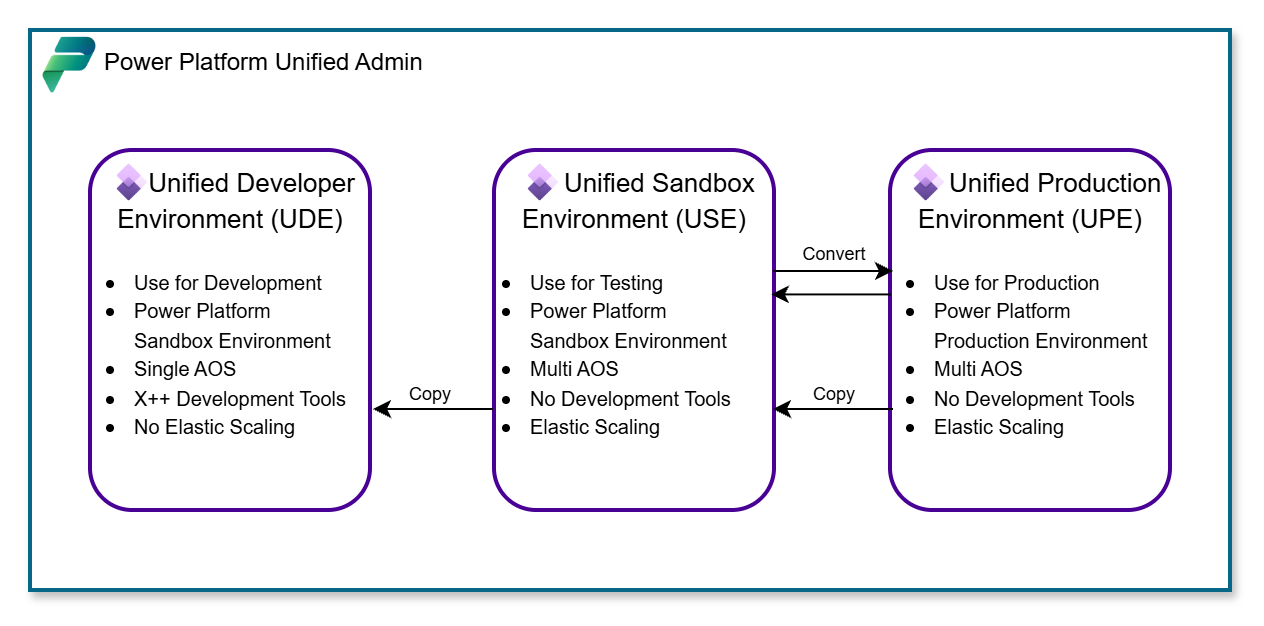
The two types of Power Platform environment relevant to F&O are Sandbox and Production. Anything non-production is deployed as a sandbox. There are 3 types of F&O environment which can be deployed to Power Platform, they are:
- Unified Developer Environment (UDE)
- Unified Sandbox Environment (USE)
- Unified Production Environment (UPE)
Unified Dev Environment (UDE)
- UDEs are Power Platform environments deployed with a provisioned F&O environment instance, and the F&O development tools.
- UDEs are deployed with a single AOS to allow smooth deployment and debugging when developing X++. The downside is that they do not come with any of the elastic scaling features of USEs and UPEs, or with any way to improve performance. If testing on one of these environments is too slow, an updated ALM strategy which deploys the solution for testing on a USE is required.
- UDEs allow package deployments from Visual Studio via the Unified Development Experience.
- UDEs allow remote debugging from Visual Studio via the Unified Development Experience.
- UDEs cannot be converted to any other environment type.
- UDEs can be copied to other UDEs.
- UDEs can be copied over from USEs.
- UDEs cannot be copied to USEs or UPEs. Keep this in mind for your ALM strategy. Golden config, data migration, or any other environment which will need to be copied to other USEs during test phases cannot originate on a UDE, data must originate on a USE.
- A UDE to USE environment copy will complete and appear successful, but F&O will not be affected.
Unified Sandbox Environment (USE) and Universal Production Environment (UPE)
- USEs are Power Platform environments deployed with a provisioned F&O environment instance, without the provision of the F&O development tools at deploy time.
- USEs are deployed with multiple AOS and Batch servers.
- USEs do not allow package deployment and debugging from Visual Studio.
- USEs can be copied to UDEs
- USEs cannot be copied over from UDEs.
- USEs can be copied over from other USEs.
- USEs can be copied over from UPEs.
- USEs can be converted to Production environments (UPE).
- USEs and UPEs use the same performance model. Both scale based on usage using elastic compute.
- Any testing, and particularly performance testing, in a USE, is being tested on the same platform as production.
- Environments are deployed on a mid-sized topology, and scale up and down as required based on demand.
Environment Copies
- Databases are copied via an Environment copy procedure. You may already be familiar with the concept which is the same for environment copies in Power Platform.
- Everything is copied. As with Power Platform and Dataverse environments, database refreshes are not an isolated process. Databases are copied with customisations, F&O versions, F&O packages, Power Platform Solutions, Add-Ins, and installed D365 Apps in Power platform, just as you would expect in a Power Platform and Dataverse environment copy.
- Any changes in your destination environment, such as Power Platform solutions or F&O deployable packages, which do not exist in the source environment, will need to be redeployed after the copy, so a solid ALM strategy is more important than ever.
- The default copy is transactionless. This is to save on available capacity, but isn’t always what is required. The two available options are currently all transactions, or no transactions at all. In the roadmap are features to allow retaining a time limited number of transactions, for example 6 months, which will be very useful when copying data back to UDEs from production to investigate a problem, without the overhead of needing to copy back an entire Production database.
- Environments provisioned and managed in LCS, such as Tier 2 Add-Ons or Legacy Production environments, can be copied over Unified Admin environments. Using the Unified Admin copy procedure in Power Platform will copy over Power Platform, Dataverse, and the connected F&O environment. The LCS managed environments can be selected as the source of the environment copy in Power Platform.
- LCS/Azure managed Cloud Hosted Environments are not compatible with any of these processes. They need to be retired from your ALM strategy as soon as possible.
Other Generic Points to Note
- The D365 F&O MCP server is supported and available. Environments provisioned via Unified Admin have the D365 F&O MCP server available and are ready to be connected to in Copilot studio via the Agent tools feature.
- LCS Add-Ins are now deployed as Dynamics 365 Apps in Power Platform. At time of writing the process for deploying some LCS add-ins to a Unified Environment is still being worked on.
- Environment slots are no longer required, environment deployments are flexible, if you have available Dataverse capacity. This can be very useful. With enough available capacity, environments can be short-lived for testing specific features in isolation, new versions, or retaining a copy of any environment for reference. This is particularly useful when following and testing some of these new procedures for the first time, as referencing a copy of the environment before making a change is simple.
- Power Platform developments, such as Power Apps or Power Automate Flows, can performed on and environment where a UDE or a USE is deployed. Consider an ALM strategy for Power Platform projects which plans for what needs to be prioritised; the ability to develop X++ and debug it in the same environment where the Power Platform development is taking place, vs: the considerable performance advantages of developing and testing Power Platform based solutions on an environment where a USE is deployed. Design your ALM based on your requirements.
- To deploy to a specific region, Powershell is required. Deploying via the GUI in PPAC does not allow selection of and therefore cannot guarantee the region for your F&O environment, only the location. For example, selecting United Kingdom could attempt to deploy your environment to either UK South or UK West. Using Powershell to deploy environments allows region selection, for example using the escapes
-Location 'United Kingdom'-RegionName uksouthwill deploy F&O to the UK South region. - The flexibility of capacity based deployments means that environments and ALM can be more flexible, hybrid, and change when requirements change.
Essential Resources and References
Elastic Compute, Scale-up and Scale Down
There are lots of excellent MS Learn and community resources out there already covering the Unified Admin, and Unified Development experiences, which include some deep dives into more technical aspects of some of the topics touched on in this article. This is an overview of the key points I have learnt along my journey, and hopefully they will come in useful to the many consultants and architects who will begin to use these features for the first time in the coming months.